BFD Overview
Bidirectional Forwarding Detection (BFD) is a hello protocol that provides the rapid detection of failures in the path and informs the clients (routing protocols) to initiate the route convergence.
It is independent of media, routing protocols, and data protocols. BFD helps in the separation of forwarding plane connectivity and control plane connectivity.
Different routing protocol hello mechanisms operate in variable rates of detection, but BFD detects the forwarding path failures at a uniform rate, thus allowing for easier network profiling and planning, and consistent and predictable re-convergence time.
OSPFv3 BFD
BFD can be used by other routing protocol including OSPFv3 the procedure for session setup and tearing down as below
BFD/OSPF session setup
-
OSPF discovers a neighbor
-
Router sends a request to the local BFD process to initiate a BFD neighbor session with the OSPF neighbor router
-
The BFD neighbor session with the OSPF neighbor router is established
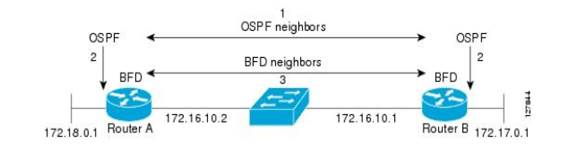
OSPF discovers a neighbor
Router sends a request to the local BFD process to initiate a BFD neighbor session with the OSPF neighbor router
The BFD neighbor session with the OSPF neighbor router is established
Tearing Down BFD/OSPF session
-
A failure occurs in the network.
-
The BFD neighbor session with the OSPF neighbor router is torn down.
-
BFD notifies the local OSPF process that the BFD neighbor is no longer reachable.
-
The local OSPF process tears down the OSPF neighbor relationship. If an alternative path is available the routers will immediately start converging on it
 Configuration Example
A failure occurs in the network.
The BFD neighbor session with the OSPF neighbor router is torn down.
BFD notifies the local OSPF process that the BFD neighbor is no longer reachable.
The local OSPF process tears down the OSPF neighbor relationship. If an alternative path is available the routers will immediately start converging on it
One of EXTREME Customer is using 100 msec bfd interval, and routing protocol like OSPF, LDP, BGP take advantage of BFD.
enable bfd vlan "t1"
configure bfd vlan "t1" receive-interval 100 transmit-interval 100
enable bfd vlan "t2"
configure bfd vlan "t2" receive-interval 100 transmit-interval 100
enable bfd vlan "t3"
configure bfd vlan "t3" receive-interval 100 transmit-interval 100
enable bfd vlan "t4"
configure bfd vlan "t4" receive-interval 100 transmit-interval 100
enable bfd vlan "t11"
configure bfd vlan "t11" receive-interval 100 transmit-interval 100
enable mpls bfd vlan "t2"
enable mpls bfd vlan "t3"
enable mpls bfd vlan "t4"
configure ospfv3 vlan t1 bfd on
configure ospfv3 vlan t2 bfd on
configure ospfv3 vlan t3 bfd on
configure ospfv3 vlan t4 bfd on
Above configuration is the lab device configuration to test network convergence time with customer’s configuration.
Limitation on EXOS
The following limitations apply to BFD in this release:
-
Direct connection (single hop) networks only are supported.
-
OSPF, MPLS and static routes act as BFD clients
-
Hitless failover is supported.
-
The echo function is not supported.
-
BFD protocol has been implemented in software. The number of sessions handled by BFD at minimal timers (less than 100ms) varies depending on platform type and processing load (which is effected by other protocols being enabled, or other system conditions such as software forwarding).
Direct connection (single hop) networks only are supported.
OSPF, MPLS and static routes act as BFD clients
Hitless failover is supported.
The echo function is not supported.
BFD protocol has been implemented in software. The number of sessions handled by BFD at minimal timers (less than 100ms) varies depending on platform type and processing load (which is effected by other protocols being enabled, or other system conditions such as software forwarding).


