PIM Sparse Mode Overview
Protocol Independent Multicast (PIM) is the de-facto standard for routing multicast traffic over the Internet. PIM does not depend on a particular unicast routing protocol for its operation. Also, it does not have any mechanism of its own for route discovery. PIM operation is based on the routing table being populated by another routing protocol, or by the user. This provides flexibility in routing unicast and multicast traffic based on a common database. PIM has two flavors, sparse and dense mode, that are deployed in different topologies. These two flavors, called PIM-SM and PIM-DM, are different in operation. PIM-SM is based on a "join protocol", where traffic is not forwarded on a segment unless an explicit request originates (typically through IGMP) from the network segment. PIM-DM is based on a "flood and prune" mechanism, where everyone receives traffic until they explicitly inform (through the PIM-DM prune mechanism) that they do not want that particular stream. Thus, PIM-DM is typically deployed in topologies where listeners are densely populated. And PIM-SM is typically deployed where the receivers are sparsely populated over the network, so that most of the network segments’ bandwidth is conserved. You can configure dense mode or sparse mode on a per-interface basis. After they are enabled, some interfaces can run dense mode, while others run sparse mode.
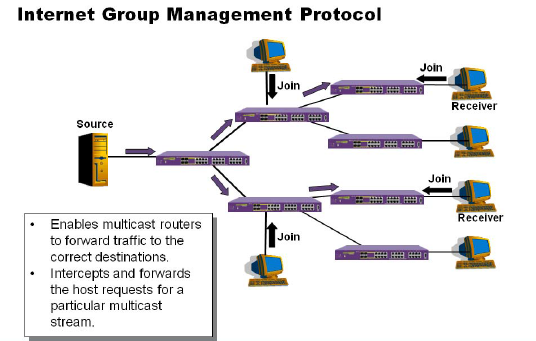
PIM-SM is an explicit join and prune protocol, which means that multicast receivers, and the routers that support them, must join multicast groups before they receive multicast traffic. When all receivers on a network branch leave a multicast group, that branch is pruned so that the multicast traffic does not continue to consume bandwidth on that branch. PIM-SM supports shared trees as well as shortest path trees (SPTs). PIM-SM is beneficial for large networks that have group members that are sparsely distributed.
PIM Sparse Mode Operation
Using PIM-SM, the router sends a join message to the rendezvous point (RP). The RP is a central multicast router that is responsible for receiving and distributing the initial multicast packets. You can configure a dynamic or static RP.
Use the below command to verify the RP information and RP unicast routing information.
# Mapping of RP and Group information verification. #
* FHR.4 # sh pim rp-set
Group Mask C-RP Origin Priority Timeout
239.1.1.1 255.255.255.255 2.2.2.2 Bootstrap 254 90
* FHR.5 # sh pim rp-set 239.1.1.1
Group Mask C-RP Origin Priority Timeout
239.1.1.1 255.255.255.255 2.2.2.2 Bootstrap 254 146
Elected RP is 2.2.2.2
# Verification of unicast routing for RP #
* FHR.6 # rtlookup 2.2.2.2
Ori Destination Gateway Mtr Flags VLAN Duration
#oa 2.2.2.2/32 192.168.102.1 14 UG-D---um--f- A102 3d:22h:5m:20s
When there is multicast traffic from directly connected senders into routers (FHR: First Hop Router), the router elected as PIM Designated Router, one with highest IP address, has responsibility of transporting the received multicast traffic into RP so that end receiver can receive the traffic. PIM DR router encapsulates the original multicast packet in a unicast message and sends it to the RP. The RP decapsulates the multicast packet and distributes it among all PIM member routers.
Use the below command to verify the source registration in RP.
# FHR is indicating that it is unicasting “Source Register” messages to the RP and receiving “Source Register Stop” messages from RP as well. #
* FHR.3 # show pim
PIM Enabled, Version 2
PIM CRP Disabled
BSR state : ACCEPT_PREFERRED ; BSR Hash Mask : 255.255.255.252
Current BSR Info : 2.2.2.2 (Priority 254) expires after 83 sec
Configured BSR Info : 0.0.0.0 (Priority 0)
CRP Adv Interval : 60 sec ; CRP Holdtime: 150
BSR Interval : 60 sec ; BSR Timeout : 130
Cache Timer : 210 sec ; Prune Timer : 210
Assert Timeout : 210 sec ; Register Suppression Timeout,Probe: 60, 5
Generation Id : 0x5425aebf Dense Neighbor Check : On
PIM-DM State Refresh TTL : 16
PIM-DM State Refresh Source Active Timer : 210
PIM-DM State Refresh Origination Interval : 60
Threshold for Last Hop Routers: 0 kbps
Threshold for RP : 0 kbps
Register-Rate-Limit-Interval : Always active
PIM SSM address range : None
PIM Register Policy : None
PIM Register Policy RP : None
PIM IP Route Sharing : Enabled
PIM IP Route Sharing Hash : Source-Group
Register Checksum to exclude data
Active Sparse Ckts 12 Dense Ckts 0 State Refresh Ckts 0
Global Packet Statistics ( In Out Drop )
C-RP-Advs 0 0 0
Registers 0 3246783 0
RegisterStops 5253917 0 0
# Correspondently RP is indicating that it is receiving and sending “Source Register” and “Source Register Stop” messages. #
RP.10 # sh pim
PIM Enabled, Version 2
PIM CRP Enabled on 1 interfaces
BSR state : ELECTED ; BSR Hash Mask : 255.255.255.252
Current BSR Info : 2.2.2.2 (Priority 254) expires after 51 sec
Configured BSR Info : 2.2.2.2 (Priority 254) in vlan ALO
CRP Adv Interval : 60 sec ; CRP Holdtime: 150
BSR Interval : 60 sec ; BSR Timeout : 130
Cache Timer : 210 sec ; Prune Timer : 210
Assert Timeout : 210 sec ; Register Suppression Timeout,Probe: 60, 5
Generation Id : 0x5425b02e Dense Neighbor Check : On
PIM-DM State Refresh TTL : 16
PIM-DM State Refresh Source Active Timer : 210
PIM-DM State Refresh Origination Interval : 60
Threshold for Last Hop Routers: 0 kbps
Threshold for RP : 0 kbps
Register-Rate-Limit-Interval : Always active
PIM SSM address range : None
PIM Register Policy : None
PIM Register Policy RP : None
PIM IP Route Sharing : Enabled
PIM IP Route Sharing Hash : Source-Group
Register Checksum to exclude data
Active Sparse Ckts 9 Dense Ckts 0 State Refresh Ckts 0
Global Packet Statistics ( In Out Drop )
C-RP-Advs 5405 5405 0
Registers 491365962 0 0
RegisterStops 0 5151321 0
When a router determines that the multicast rate has exceeded a configured threshold, that router can send an explicit join to the originating router. In EXOS, SPT cutover threshold is 0 kbps by default which means RP and LHR(Last Hop Router) will switch to SPT right after first multicast packets from the source.
# SPT Threshold #
RP.10 # sh pim
PIM Enabled, Version 2
PIM CRP Enabled on 1 interfaces
BSR state : ELECTED ; BSR Hash Mask : 255.255.255.252
Current BSR Info : 2.2.2.2 (Priority 254) expires after 51 sec
Configured BSR Info : 2.2.2.2 (Priority 254) in vlan ALO
CRP Adv Interval : 60 sec ; CRP Holdtime: 150
BSR Interval : 60 sec ; BSR Timeout : 130
Cache Timer : 210 sec ; Prune Timer : 210
Assert Timeout : 210 sec ; Register Suppression Timeout,Probe: 60, 5
Generation Id : 0x5425b02e Dense Neighbor Check : On
PIM-DM State Refresh TTL : 16
PIM-DM State Refresh Source Active Timer : 210
PIM-DM State Refresh Origination Interval : 60
Threshold for Last Hop Routers: 0 kbps
Threshold for RP : 0 kbps
Register-Rate-Limit-Interval : Always active
PIM SSM address range : None
PIM Register Policy : None
PIM Register Policy RP : None
PIM IP Route Sharing : Enabled
PIM IP Route Sharing Hash : Source-Group
Register Checksum to exclude data
Active Sparse Ckts 9 Dense Ckts 0 State Refresh Ckts 0
Global Packet Statistics ( In Out Drop )
C-RP-Advs 5405 5405 0
Registers 491365962 0 0
RegisterStops 0 5151321 0
When this occurs, the receiving router gets the multicast directly from the sending router and bypasses the RP.
# FHR is now transmitting native multicast stream via SPT consisting of vlan A102 with flags FW(Forward), SM(Sparse Mode) and S ((s,g) received). #
*FHR.3 # sh pim cache 239.1.1.1 192.168.91.2
Index Dest Group Source InVlan Origin
[0001] 239.1.1.1 192.168.91.2 (S) A991 Sparse
Expires after 194 secs UpstNbr: 0.0.0.0
RP: 2.2.2.2 via 192.168.102.1 in A102
EgressIfList = A102(193)(FW)(SM)(S)
# IR has (S,G) entry in its own PIM cache as well and please see InVlan for RPF check and EgressIfList for SPT based on the unicast routing information. #
*IR.4 # sh pim cache 239.1.1.1 192.168.91.2
Index Dest Group Source InVlan Origin
[0001] 239.1.1.1 192.168.91.2 (S) A102 Sparse
Expires after 194 secs UpstNbr: 192.168.201.2
RP: 2.2.2.2 via 192.168.102.1 in A102
EgressIfList = A201(192)(FW)(SM)(S)
Understanding PIM Trees
In PIM-SM, there are two different trees built upon receiver’s request to join (igmp)/source registration. and PIM join for the shortest path to the source. The first tree is called RPT (Rendezvous Point Tree) which is rooted at RP and the second tree is SPT (Shortest Path Tree) rooted at source - FHR(First Hop Router). We’ll have a look at the two different phases to find out how it is expected in EXOS.
- Verification of RPT
o Recievers at LHR
LHR (Last Hop Router) joins the shared tree towards the RP regardless of multicast existence. RP and LHR always maintains this status as long as there are receivers. “EgressIfList” is indicating where the receivers are located and “InVlan” is the path toward the RP in this case.
# Check out whether there are receivers using IGMP at access vlans. #
LHR.17 # show igmp vlan "A100"
Query Interval : 125 sec
Max Response Time : 10 sec
Last Member Query : 1 sec
Robustness : 2
Interface on VLAN A100 is enabled and up.
inet 100.100.100.1/24
Locally registered multicast addresses:
224.0.0.2 224.0.0.13 224.0.0.22
Learned multicast addresses(Last Querier=100.100.100.1):
239.1.1.1(s)
s = static igmp member
Flags:
IP Fwding YES IPmc Fwding YES IGMP YES
IGMP Ver V2 Snooping YES Proxy Query YES
XmitRtrAlrt YES RcvRtrAlrtReq NO
LHR.17 # show igmp vlan "A100"
Query Interval : 125 sec
Max Response Time : 10 sec
Last Member Query : 1 sec
Robustness : 2
Interface on VLAN A100 is enabled and up.
inet 100.100.100.1/24
Locally registered multicast addresses:
224.0.0.2 224.0.0.13 224.0.0.22
Learned multicast addresses(Last Querier=100.100.100.1):
239.1.1.1(s)
s = static igmp member
Flags:
IP Fwding YES IPmc Fwding YES IGMP YES
IGMP Ver V2 Snooping YES Proxy Query YES
XmitRtrAlrt YES RcvRtrAlrtReq NO
LHR.18 # show igmp group 239.1.1.1
Group Address Ver Vlan Port Age
239.1.1.1(s) 2 A100 1 0
Total: 1
# There should be (*,G) status in LHR as long as there are receivers for the group. #
LHR.21 # show pim cache detail
Index Dest Group Source InVlan Origin
[0000] 239.1.1.1 2.2.2.2 (WR) A201 Sparse
Entry timer is not run; UpstNbr: 192.168.201.2
EgressIfList = A100(0)(FW)(SM)(I)
Number of multicast cache = 1
Entry flags :-
R: RP tree. S: Source tree. W: Any source.
Egress/Pruned interface flags :-
SM: Sparse Mode DM: Dense Mode
Fw: Forwarding PP: Prune pending
AL: Assert Loser N: Neighbor present
I: IGMP member present S: (s,g) join received
Z: (*,g) join received Y: (*,*,rp) join received
o RP
At RP, there should be (*, G) status like LHR as long as there are receivers regardless of multicast stream existence in the network.
# There should be (*,G) status in RP even if there is no multicast stream from the source. #
RP.12 # sh pim cach detail
Index Dest Group Source InVlan Origin
[0000] 239.1.1.1 2.2.2.2 (WR) (null) Sparse
Expires after 170 secs UpstNbr: 0.0.0.0
EgressIfList = A201(169)(FW)(SM)(Z)
Number of multicast cache = 1
Entry flags :-
R: RP tree. S: Source tree. W: Any source.
Egress/Pruned interface flags :-
SM: Sparse Mode DM: Dense Mode
Fw: Forwarding PP: Prune pending
AL: Assert Loser N: Neighbor present
I: IGMP member present S: (s,g) join received
Z: (*,g) join received Y: (*,*,rp) join received
# There is no (*,G) status in FHR indicating no multicast stream initiated. #
* FHR.12 # show pim cache
Index Dest Group Source InVlan Origin
Number of multicast cache = 0
Entry flags :-
R: RP tree. S: Source tree. W: Any source.
Egress/Pruned interface flags :-
SM: Sparse Mode DM: Dense Mode
Fw: Forwarding PP: Prune pending
AL: Assert Loser N: Neighbor present
I: IGMP member present S: (s,g) join received
Z: (*,g) join received Y: (*,*,rp) join received
- Verification of SPT
o at FHR
FHR (First Hop Router) initiating multicast stream by registering the source like capture.
# FHR is initiating multicast and registering source to RP. #
* FHR.15 # sh pim
PIM Enabled, Version 2
PIM CRP Disabled
BSR state : ACCEPT_PREFERRED ; BSR Hash Mask : 255.255.255.252
Current BSR Info : 2.2.2.2 (Priority 254) expires after 122 sec
Configured BSR Info : 0.0.0.0 (Priority 0)
CRP Adv Interval : 60 sec ; CRP Holdtime: 150
BSR Interval : 60 sec ; BSR Timeout : 130
Cache Timer : 210 sec ; Prune Timer : 210
Assert Timeout : 210 sec ; Register Suppression Timeout,Probe: 60, 5
Generation Id : 0x5425aebf Dense Neighbor Check : On
PIM-DM State Refresh TTL : 16
PIM-DM State Refresh Source Active Timer : 210
PIM-DM State Refresh Origination Interval : 60
Threshold for Last Hop Routers: 0 kbps
Threshold for RP : 0 kbps
Register-Rate-Limit-Interval : Always active
PIM SSM address range : None
PIM Register Policy : None
PIM Register Policy RP : None
PIM IP Route Sharing : Enabled
PIM IP Route Sharing Hash : Source-Group
Register Checksum to exclude data
Active Sparse Ckts 12 Dense Ckts 0 State Refresh Ckts 0
Global Packet Statistics ( In Out Drop )
C-RP-Advs 0 0 0
Registers 0 1 0
RegisterStops 1 0 0
# RP is now registering source of (239.1.1.1) which is 192.168.91.2. #
RP.10 # sh pim
PIM Enabled, Version 2
PIM CRP Enabled on 1 interfaces
BSR state : ELECTED ; BSR Hash Mask : 255.255.255.252
Current BSR Info : 2.2.2.2 (Priority 254) expires after 13 sec
Configured BSR Info : 2.2.2.2 (Priority 254) in vlan ALO
CRP Adv Interval : 60 sec ; CRP Holdtime: 150
BSR Interval : 60 sec ; BSR Timeout : 130
Cache Timer : 210 sec ; Prune Timer : 210
Assert Timeout : 210 sec ; Register Suppression Timeout,Probe: 60, 5
Generation Id : 0x5425b02e Dense Neighbor Check : On
PIM-DM State Refresh TTL : 16
PIM-DM State Refresh Source Active Timer : 210
PIM-DM State Refresh Origination Interval : 60
Threshold for Last Hop Routers: 0 kbps
Threshold for RP : 0 kbps
Register-Rate-Limit-Interval : Always active
PIM SSM address range : None
PIM Register Policy : None
PIM Register Policy RP : None
PIM IP Route Sharing : Enabled
PIM IP Route Sharing Hash : Source-Group
Register Checksum to exclude data
Active Sparse Ckts 9 Dense Ckts 0 State Refresh Ckts 0
Global Packet Statistics ( In Out Drop )
C-RP-Advs 1 1 0
Registers 2 0 0
RegisterStops 0 1 0
o at FHR, RP and LHR
There are PIM cache created for group and source such as 239.1.1.1 and 192.168.91.2
LHR.7 # show pim cache 239.1.1.1 192.168.91.2
Index Dest Group Source InVlan Origin
[0001] 239.1.1.1 192.168.91.2 (S) A202 Sparse
Expires after 15 secs UpstNbr: 192.168.202.2
RP: 2.2.2.2 via 192.168.201.2 in A201
EgressIfList = A100(0)(FW)(SM)(I)
Number of multicast cache = 2
Entry flags :-
R: RP tree. S: Source tree. W: Any source.
Egress/Pruned interface flags :-
SM: Sparse Mode DM: Dense Mode
Fw: Forwarding PP: Prune pending
AL: Assert Loser N: Neighbor present
I: IGMP member present S: (s,g) join received
Z: (*,g) join received Y: (*,*,rp) join received
RP.11 # show pim cache 239.1.1.1 192.168.91.2
Index Dest Group Source InVlan Origin
[0001] 239.1.1.1 192.168.91.2 (S) A102 Sparse
Expires after 203 secs UpstNbr: 192.168.102.2
RP: 2.2.2.2 via 0.0.0.0 in (null)
EgressIfList = A202(171)(FW)(SM)(S)
Number of multicast cache = 2
Entry flags :-
R: RP tree. S: Source tree. W: Any source.
Egress/Pruned interface flags :-
SM: Sparse Mode DM: Dense Mode
Fw: Forwarding PP: Prune pending
AL: Assert Loser N: Neighbor present
I: IGMP member present S: (s,g) join received
Z: (*,g) join received Y: (*,*,rp) join received
* FHR.17 # show pim cache 239.1.1.1 192.168.91.2
Index Dest Group Source InVlan Origin
[0001] 239.1.1.1 192.168.91.2 (S) A991 Sparse
Expires after 156 secs UpstNbr: 0.0.0.0
RP: 2.2.2.2 via 192.168.102.1 in A102
EgressIfList = A102(155)(FW)(SM)(S)
Number of multicast cache = 2
Entry flags :-
R: RP tree. S: Source tree. W: Any source.
Egress/Pruned interface flags :-
SM: Sparse Mode DM: Dense Mode
Fw: Forwarding PP: Prune pending
AL: Assert Loser N: Neighbor present
I: IGMP member present S: (s,g) join received
Z: (*,g) join received Y: (*,*,rp) join received