Thursday, July 6, 2017

Next-hop field in RIP route


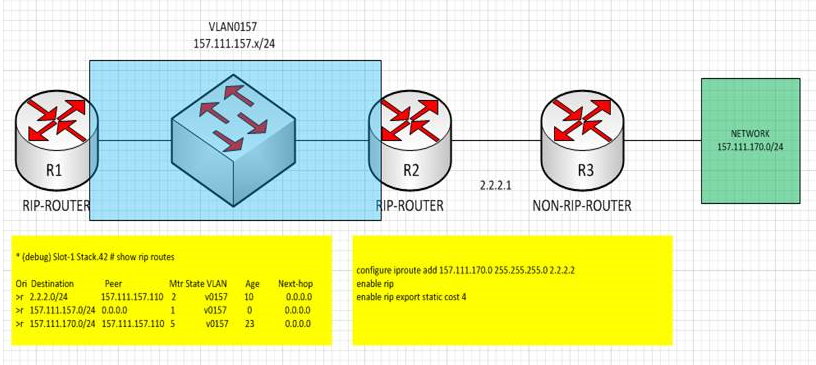
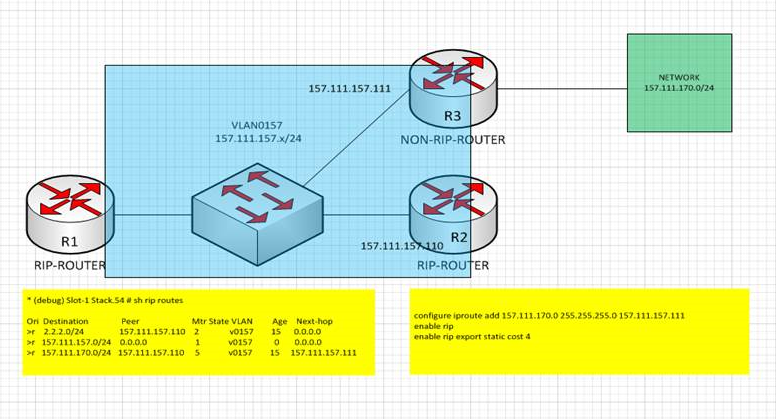
RIP route has multiple fields such as Peer, Metric, Age, and Next-hop etc. Normally next-hop has just 0.0.0.0, and traffic to this destination will be sent to RIP peer.


However, there is case that this next-hop field need to be used for efficient traffic forwarding.
In below diagram, router which doesn’t have RIP functionality having the destination route of the traffic. In this case, R2 can distribute the route to RIP domain instead of R3, but R2 will distribute the route with ip address of R3 as a next hop. So, the traffic to the destination will directly forward to R3 without traverse R2.


Monday, June 26, 2017

Debugging Local Multicast on EXOS

Debugging Multicast Issues

Local Multicast address packets are handled differently when compared to data packets. Multicast forwarding/flooding mechanism is based on following three configurations;


1. Ingress vlan is L3 Vlan/L2 Vlan.
2. Snooping enabled/disabled.
3. Local Multicast forwarding configuration slow-path/fast path.
Forwarding behavior for Local multicast packets as well as data packets is as follows.


Configuration
224.0.0.x
IP address not configured(L2 vlan)
Fast-path flood
IP address configured(L3 vlan)
Slow-path flood


Configuration
Multicast stream
IGMP snooping enabled
Fast-path forward
IGMP snooping disabled
Fast-path flood

Debugging Issues with Local Multicast Packets(224.0.0.x) forwarding

L3 Vlan - vlan with IP address assigned.

All packets are flooded via software(slow-path) alone. There will be no cache entry in the hardware/HAL for these streams. Cache entry will be present only in Kernel and software. The following things are to be checked.
1. show mcast cache . In this output, check whether the proper source IP, group IP, egress ports, egress vlan of the stream is present.
If the entry is fine in software, then check whether the corresponding entry is present in Kernel.
2. !cat proc/net/snoop_mr_cache . In this outputs, check whether (S,G) entry is there and corresponding ingress port/egress ports are programmed properly.
In some rare cases, (S,G) information is present but not the ports details. Then this cache is just an unresolved cache and will not be used for packet forwarding.
If the (S,G) entry is not present in both software and kernel, check whether the packets are hitting the CPU using the below command.
To abort the capture, use (Ctrl+C). In case the packets are not at all hitting the CPU, then check whether the filters are installed in hardware properly.
check whether appropriate filter is installed in the ingress port. To proceed finding the hardware acl, follow the steps below.
  1. Open another telnet session, lets say session
  2. Now get into the BCM shell in the session
  3. From the session 1, execute the below command.
6. fp show entry <eid> , whereas <eid> is derived from above step(step 5 command).
If the hardware ACL is not installed in that port, this could be issue with ACL or the configuration part like igmp filter configuration, snooping configuration etc. Check “show configuration mcmgr” output.

Tuesday, June 13, 2017

Single Sign On - Identifi Radius Accounting interim message

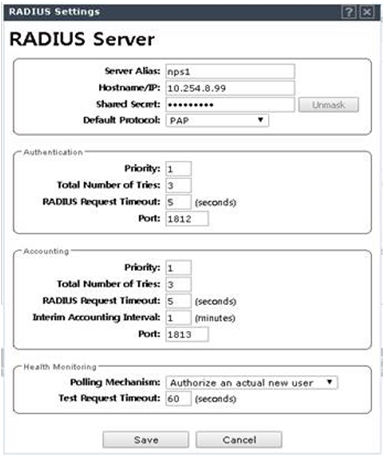
Radius Server can be configured on Identifi controller and can be configured to send accounting information at the time of Authentication/Authorization. There is additional function named Interim Accounting Interval which can be used to send accounting message periodically every configured period. In below configuration, controller configured to send interim accounting message every one minute.


As a result, controller send Radius Accounting message every one minute. ( Verified by packet capture.)


RADIUS SSO Requirements ( From Watchguard )

You can use RADIUS Single Sign-On with wireless access point or other RADIUS clients that include the required information in the RADIUS accounting messages. For RADIUS SSO to operate, the RADIUS accounting Start, Stop, and Interim-Update accounting messages sent by the RADIUS client must include these attributes:
  • User-Name — The name of the authenticated user
  • Framed-IP-Address — The client IP address of the authenticated user
WatchGuard AP devices that use the latest version of AP firmware meet these requirements. Other wireless access points that support these requirements should also operate correctly for RADIUS SSO.

Some access points do not assign the client IP address until after the user authenticates. For these access points, the Start accounting message might not include the Framed-IP-Address attribute. After the user authenticates, the access point immediately sends an Interim-Update accounting message that includes the Framed-IP-Address attribute. Even though the Start message does not include the Framed-IP-Address attribute, RADIUS SSO functions correctly.

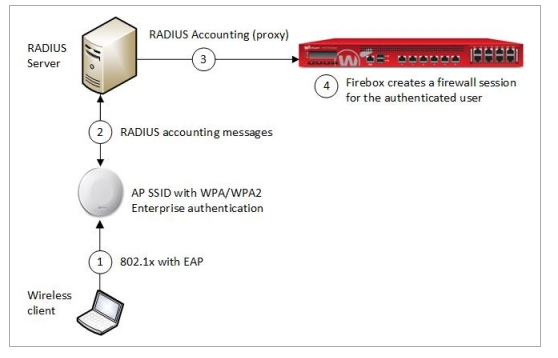
How Radius SSO works.  ( From WatchGuard )
When a user connects and authenticates to a RADIUS client, such as a wireless access point, the RADIUS client sends accounting messages to the RADIUS server. The RADIUS server sends these accounting messages to the Firebox and the Firebox creates a firewall session for the user at the specified client IP address. When the user disconnects, the RADIUS server sends an accounting message to the Firebox and the Firebox removes the user session


Wednesday, May 17, 2017

Checking routing information on EXOS ( software level - Hal level - BCM level )

Routing information learning on the software first by using different routing protocol and route manager.


[ software information ]
* core1.3 # sh iproute
Ori  Destination        Gateway         Mtr  Flags         VLAN       Duration
#d   1.1.1.0/30         1.1.1.1         1    U------um--f- isc        1d:21h:34m:25s
#oa  192.168.0.1/32     192.168.1.1     14   UG-D---um--f- bb1        1d:17h:28m:19s
#d   192.168.1.0/24     192.168.1.2     1    U------um--f- bb1        1d:17h:34m:16s
#oa  192.168.2.0/24     192.168.1.1     8    UG-D---um--f- bb1        1d:17h:28m:19s
#d   192.168.3.0/24     192.168.3.1     1    U------um--f- bb3        1d:17h:26m:58s
#d   192.168.100.0/24   192.168.100.1   1    U------um--f- data       1d:21h:28m:29s


This information will be transformed to the type of HAL information, and will programmed on BCM packet forwarding chip


[ HAL  Layer ]
* core1.6 # debug hal show ipv4Fib
                           HAL IPv4 FIB:
VrId Prefix/Mask        Gateway         GwVr  Vlan    MAC               Port     Or Ref Ins Flags Bucket
=======================================================================================================
  2 192.168.000.001/32 192.168.001.001    2 1000013 00:04:96:52:21:88 00010001 25   1   1 F---  9999
  2 001.001.001.000/30 001.001.001.001    2 1000008 00:00:00:00:00:00 00000000  2   1   1 F-D-  9999
  2 192.168.001.000/24 192.168.001.002    2 1000013 00:00:00:00:00:00 00000000  2   1   1 F-D-  9999
  2 192.168.002.000/24 192.168.001.001    2 1000013 00:04:96:52:21:88 00010001 25   1   1 F---  9999
  2 192.168.003.000/24 192.168.003.001    2 1000015 00:00:00:00:00:00 00000000  2   1   1 F-D-  9999
  2 192.168.100.000/24 192.168.100.001    2 1000011 00:00:00:00:00:00 00000000  2   1   1 F-D-  9999


[BCM Layer]
BCM.0> l3 defip show
Unit 0, Total Number of DEFIP entries: 12288
Free DEFIP entries: 12277
Max number of ECMP paths 4
#     VRF     Net addr             Next Hop Mac        INTF MODID PORT HIT
1537   2      192.168.0.1/32       00:04:96:52:21:88      3    0     2   n                        (NH Table index = 6)
1537   2      192.168.100.2/32     00:04:96:51:77:cc      2    0     4   y                        (NH Table index = 4)
1538   2      192.168.1.1/32       00:04:96:52:21:88      3    0     2   y                        (NH Table index = 6)
1538   2      192.168.100.100/32   00:04:96:6c:ee:08      2   T      0   y                        (NH Table index = 3)
1539   2      192.168.100.4/32     00:04:96:6c:ee:07      2   T      0   y                        (NH Table index = 5)
1539   2      192.168.100.3/32     00:04:96:83:90:a1      2   T      0   y                        (NH Table index = 7)
3073   2      1.1.1.0/30           00:00:00:00:00:00   4095    0     0   n      (LOCAL ROUTE)     (NH Table index = 1)
4609   2      192.168.100.0/24     00:00:00:00:00:00   4095    0     0   y      (LOCAL ROUTE)     (NH Table index = 1)
4609   2      192.168.1.0/24       00:00:00:00:00:00   4095    0     0   y      (LOCAL ROUTE)     (NH Table index = 1)
4610   2      192.168.2.0/24       00:04:96:52:21:88      3    0     2   n                        (NH Table index = 6)
4610   2      192.168.3.0/24       00:00:00:00:00:00   4095    0     0   n      (LOCAL ROUTE)     (NH Table index = 1)


Tuesday, May 16, 2017

Script - Expect

Below expect script can be used to access to the EXTREME switch and enter into BCM shell, and gathering the counters from BCM shell.

#!/usr/bin/expect -f
proc ap_to_file {file string} {


   set log [open $file a]
   puts $log $string
   close $log


}


set log_file_name log_[join [split [clock format \
     [clock seconds] -format %D/%H/%M/%S] /] "_"]
set f_log [open $log_file_name w]
close $f_log


if { [file exist $argv ] } {
   set f_details [open $argv r]
} else {
   puts "Invalid file name $argv";
   return;
}


gets $f_details line
set delay [lindex $line 0]
set limit [lindex $line 1]


while { [gets $f_details line] != "-1" } {
   lappend details [lindex [split $line ,] 0]
   lappend details [lindex [split $line ,] 1]
   lappend details [lindex [split $line ,] 2]
   lappend details [lindex [split $line ,] 3]
   lappend details [lindex [split $line ,] 4]
   puts "$line"
}
close $f_details
set match_max 300000
for { set i 1 } { $i <= $limit } { incr i } {
ap_to_file $log_file_name "
---------------------
Iteration $i starts
---------------------
"
   foreach { ip_connect slot_list user pwd dbg_pwd } $details {
       if { $ip_connect == "" } {
           puts "ip value Null";
           return;
       }
       while { [catch {spawn telnet $ip_connect} err] == 1 } {
          puts "Couldn't connect to $ip_connect ; retrying after 5 seconds"
          after 5000
}
       expect login
send $user\r
expect "password"
       send "$pwd\r"
       ap_to_file $log_file_name "-----------------------------------"
       ap_to_file $log_file_name "Entering switch $ip_connect"
       ap_to_file $log_file_name "-----------------------------------"
       expect " # "
       ap_to_file $log_file_name $expect_out(buffer);
       send "disable clipaging\r"
       expect " # "
       ap_to_file $log_file_name $expect_out(buffer);
       send "show version\r";
       expect "#"
       ap_to_file $log_file_name $expect_out(buffer);
       send "show log\r";
       expect {
          "*\n" {
             ap_to_file $log_file_name $expect_out(buffer);
             exp_continue;
          }
       " # " { }
       }
       send "show memory\r";
       expect {
          "*\n" {
             ap_to_file $log_file_name $expect_out(buffer);
             exp_continue;
          }
       " # " { }
       }
       ap_to_file $log_file_name $expect_out(buffer);
       send "enable debug-mode\r";
       expect "EXOS*password:";
       ap_to_file $log_file_name $expect_out(buffer);
       send $dbg_pwd\r;
       expect "debug*#"
       ap_to_file $log_file_name $expect_out(buffer);
       send "debug hal show sys-health-check\r";
       expect {
          "*\n" {
             ap_to_file $log_file_name $expect_out(buffer);
             exp_continue;
          }
       " # " { }
       }
       ap_to_file $log_file_name $expect_out(buffer);
       send "debug hal show platform fdb 11\r";
       expect {
          "*\n" {
             ap_to_file $log_file_name $expect_out(buffer);
             exp_continue;
          }
       " # " { }
       }
       ap_to_file $log_file_name $expect_out(buffer);
       send "debug msg show msg\r";
       expect {
          "*\n" {
             ap_to_file $log_file_name $expect_out(buffer);
             exp_continue;
          }
       " # " { }
       }
       ap_to_file $log_file_name $expect_out(buffer);


       foreach slot $slot_list {
           ap_to_file $log_file_name "  --------------------------------"
           ap_to_file $log_file_name "  Entering slot $slot"
           ap_to_file $log_file_name "  --------------------------------"
           send "!telnet -v1 10.0.$slot.2\r";
           expect "~ #";
           ap_to_file $log_file_name $expect_out(buffer);
           send "cat /proc/meminfo_better\r";
           expect "~ #";
           ap_to_file $log_file_name $expect_out(buffer);
           send "cat /proc/slabinfo\r";
           expect {
              "*\n" {
                 ap_to_file $log_file_name $expect_out(buffer);
                 exp_continue;
              }
           "~ #" { }
           }
           send "top -b -n1 | head -n20\r";
           expect "~ #";
           ap_to_file $log_file_name $expect_out(buffer);
           ap_to_file $log_file_name "  --------------------------------"
           ap_to_file $log_file_name "  Entering BCM shell"
           ap_to_file $log_file_name "  --------------------------------"
           send "/extr/bin/bcm.shell\r";
           send "\r";
           expect "BCM*>";
           ap_to_file $log_file_name $expect_out(buffer);
           send "0:\r";
           expect "BCM*>"
           ap_to_file $log_file_name $expect_out(buffer);
           send "async\r";
           expect "BCM*>";
           ap_to_file $log_file_name $expect_out(buffer);
           send "soc\r";
           expect "BCM*>";
           ap_to_file $log_file_name $expect_out(buffer);
           send "show error\r";
           expect "BCM*>";
           ap_to_file $log_file_name $expect_out(buffer);
           send "get L2_ENTRY_PARITY_STATUS\r";
           expect "BCM*>";
           ap_to_file $log_file_name $expect_out(buffer);
           send "get L3_DEFIP_PARITY_STATUS\r";
           expect "BCM*>";
           ap_to_file $log_file_name $expect_out(buffer);
           ap_to_file $log_file_name "    ------------------------------"
           ap_to_file $log_file_name "    Switching to unit 1"
           ap_to_file $log_file_name "    ------------------------------"
           send "1:\r";
           expect "BCM*>";
           ap_to_file $log_file_name $expect_out(buffer);
           send "async\r";
           expect "BCM*>";
           ap_to_file $log_file_name $expect_out(buffer);
           send "soc\r";
           expect "BCM*>";
           ap_to_file $log_file_name $expect_out(buffer);
           send "show error\r";
           expect "BCM*>";
           ap_to_file $log_file_name $expect_out(buffer);
           send "get L2_ENTRY_PARITY_STATUS\r";
           expect "BCM*>";
           ap_to_file $log_file_name $expect_out(buffer);
           send "get L3_DEFIP_PARITY_STATUS\r";
           expect "BCM*>";
           ap_to_file $log_file_name $expect_out(buffer);
           send "0:\r"
           expect "BCM*>"
           send "quit\r";
           expect "~ #";
           ap_to_file $log_file_name $expect_out(buffer);
           send "exit\r";
           expect " # ";
           ap_to_file $log_file_name $expect_out(buffer);
       }


       send logout\r;


}
   if { $i != $limit  } {
       after [expr $delay * 1000];
   }
   ap_to_file $log_file_name "
------------------------
Iteration $i done
------------------------"
}
puts ""
puts "-----------------------"
puts "logs are available at ./$log_file_name"
puts "-----------------------"